
Introduction
Nameservers control where your domain’s DNS is managed.
Changing your nameservers tells the internet which provider is responsible for your domain’s DNS records. This can affect where your website loads from, where your email is delivered, and which system you use to manage DNS records.
For example, you may need to update your nameservers if you are moving your website to another provider, using an external DNS service, or following setup instructions from a web designer or third-party platform.
Before you start
Before changing your nameservers, please make sure you have the full nameserver details from your new provider.
Nameservers usually look similar to:
ns1.examplenameservers.com
ns2.examplenameservers.com
Important information before changing nameservers
Changing nameservers can affect your website, email, and other domain services.
If your email is currently working through Hosting Ireland, changing nameservers may stop your email from working unless the correct email DNS records are added with the new DNS provider.
If your website is currently hosted with Hosting Ireland, changing nameservers may stop the website from loading from your Hosting Ireland hosting package unless the new DNS provider has the correct website records.
Nameserver changes can take time to update across the internet. This is known as DNS propagation. Changes can often start working within a few hours, but can take up to 24 hours to fully update.
You should only change your nameservers if you are sure the new provider has given you the correct nameserver details.
Step One
Log in to your Hosting Ireland Client Area.
For a full walkthrough, see:
How to access your Client Area
Step Two
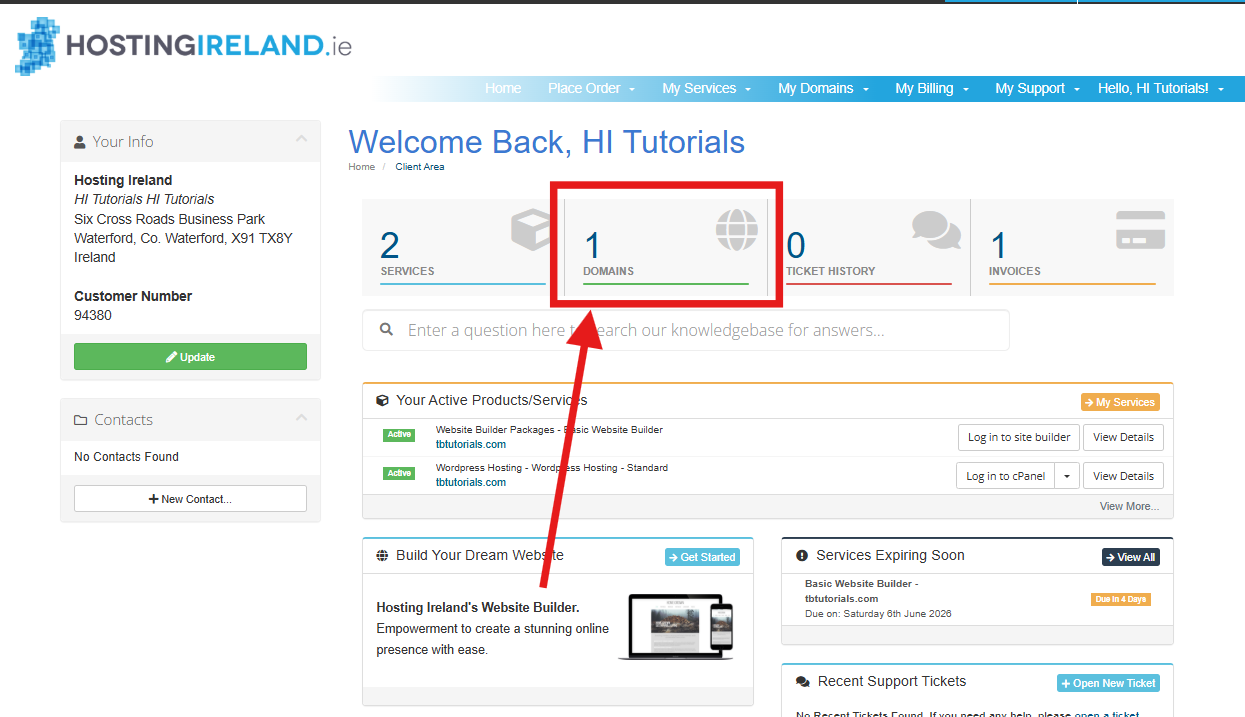
From your Client Area dashboard, select Domains.
You can either select the Domains box on the dashboard or choose My Domains from the top menu.
Step Three
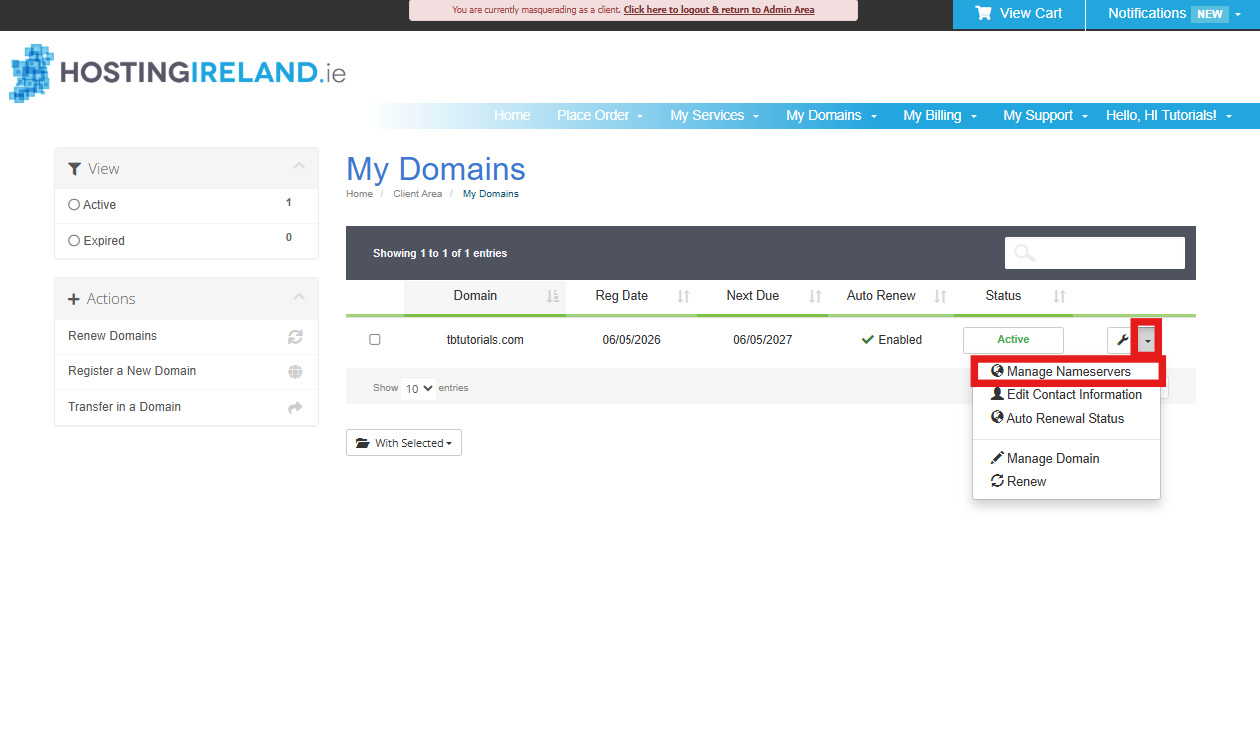
You will now see a list of domains on your account.
Find the domain you want to update.
On the right-hand side of the domain row, select the drop-down menu beside the spanner icon, then select Manage Nameservers.
Step Four
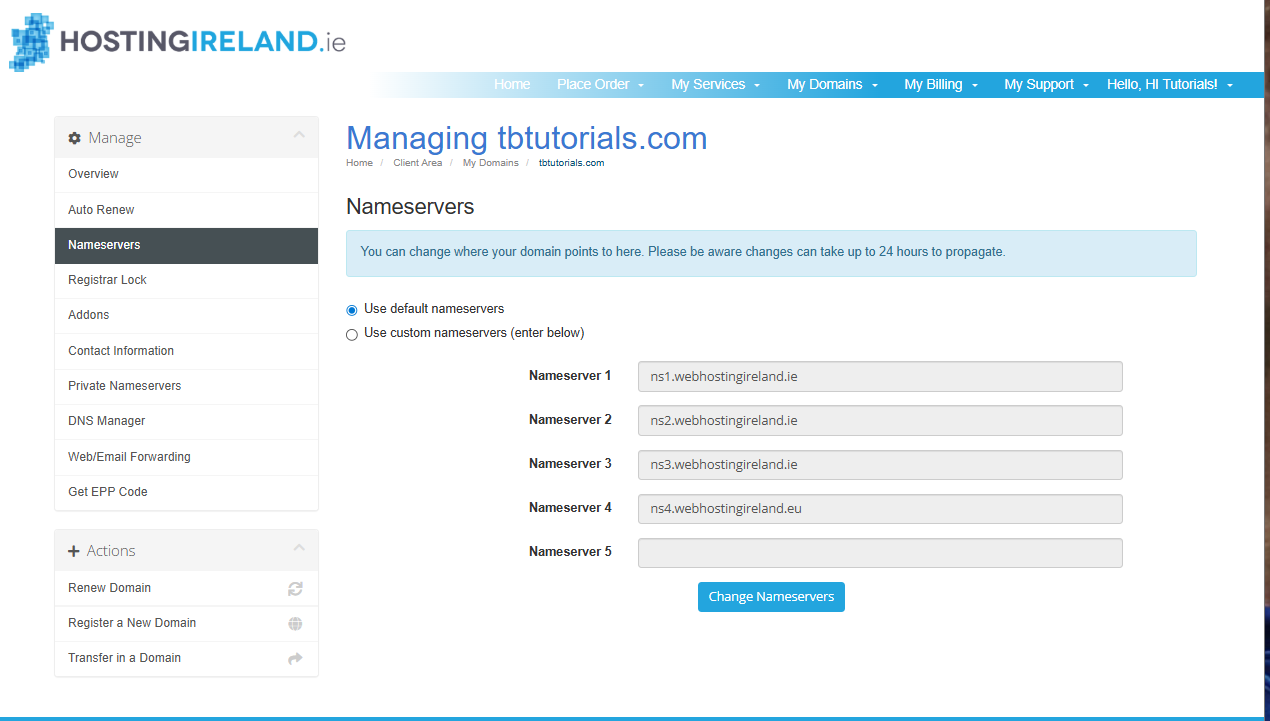
You will now see the nameserver management page for the domain.
Domains registered with Hosting Ireland will normally use our default nameservers unless they have already been changed.
If your domain is currently using the Hosting Ireland default nameservers, Use default nameservers will be selected.
Step Five
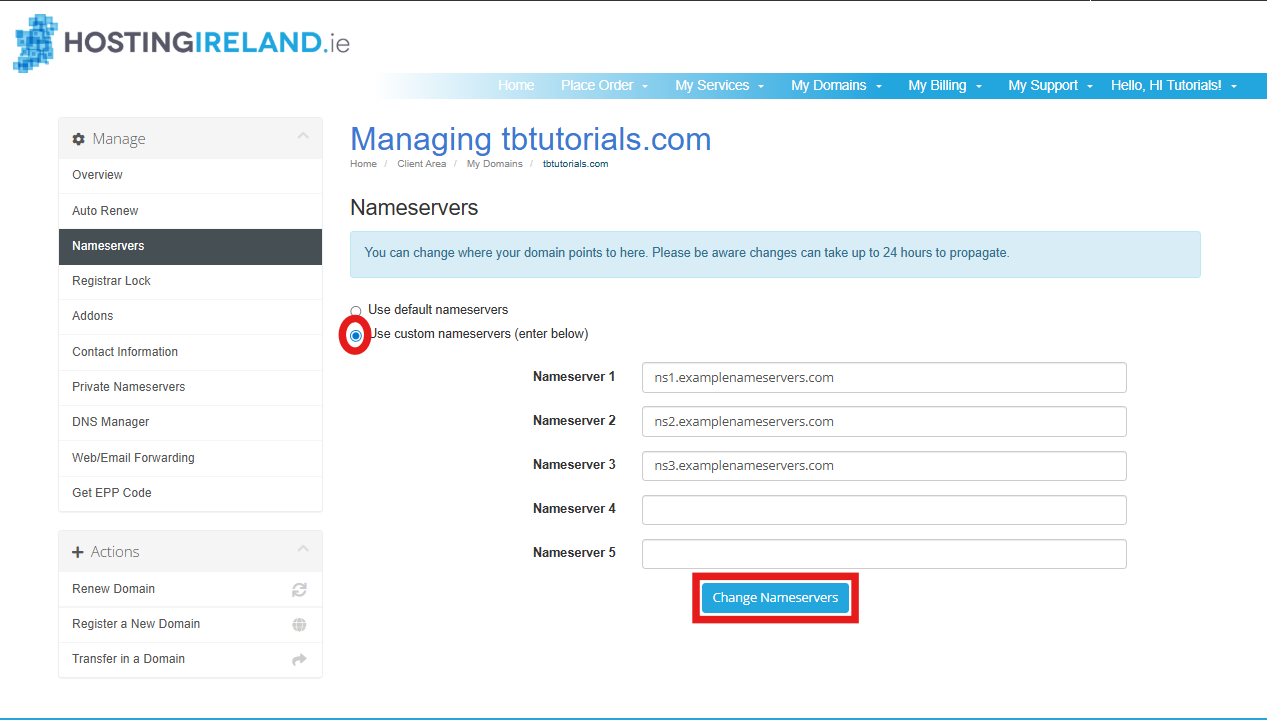
To use nameservers from another provider, select:
Use custom nameservers (enter below)
Delete any existing nameserver entries from the boxes.
Enter the nameservers supplied by your new provider.
Make sure each nameserver is entered into a separate box.
For example:
Nameserver 1
ns1.examplenameservers.com
Nameserver 2
ns2.examplenameservers.com
Nameserver 3
ns3.examplenameservers.com
You do not need to fill every nameserver box. Only enter the nameservers your provider has given you.
Step Six
Once the correct nameservers have been entered, select Change Nameservers.
Your nameserver update will then be submitted.
After changing nameservers
After the change has been made, the domain may not update everywhere immediately.
During propagation, some visitors may see the old service while others see the new service. Email may also behave inconsistently if the required mail records have not been added at the new DNS provider.
If you are moving DNS away from Hosting Ireland, any future DNS changes will usually need to be made with the provider whose nameservers you have entered.
For example, if you change your nameservers to another website provider, Hosting Ireland may no longer control the live DNS zone for the domain.
Common problems
My website stopped working after changing nameservers
This usually means the new DNS provider does not have the correct website DNS records, or the website platform has not finished setting up the domain.
You should check the setup instructions from your website provider and make sure the domain has been added correctly on their side.
My email stopped working after changing nameservers
If your email is hosted with Hosting Ireland, your new DNS provider must have the correct Hosting Ireland email records added.
This normally includes MX records and may also include SPF, DKIM, and DMARC records.
Changing nameservers without adding the correct email records at the new provider can stop mail from being delivered.
I only want to point my website elsewhere
You may not always need to change nameservers.
Some providers allow you to keep your current nameservers and only update specific DNS records, such as A records or CNAME records. This can be safer if your email is already working and you only want to change where the website points.
Check your third-party provider’s instructions before deciding whether to change nameservers or only update DNS records.
I entered the nameservers but the site is still not working
Nameserver changes can take up to 24 hours to fully update.
If it has been more than 24 hours, check that:
- The nameservers were entered correctly.
- There are no spelling mistakes.
- The new provider has created a DNS zone for your domain.
- Your website or email service is fully set up with the new provider.
When to contact support
If you are unsure whether you should change nameservers, please contact us before making the change.
When contacting support, please include:
- The domain name.
- The nameservers you have been asked to use.
- The provider or platform you are trying to connect to.
- Whether your email should continue working with Hosting Ireland.
- Whether your website should stay with Hosting Ireland or move to another provider.
Need more help?
If you have any further questions, please raise a support request from your Client Area or call us on 01 9020020.

'%3e%3cg id='Final-Copy-2_2_' transform='translate(1275.000000, 200.000000)'%3e%3cpath class='st0' d='M7.4,12.8h6.8l3.1-11.6H7.4C4.2,1.2,1.6,3.8,1.6,7S4.2,12.8,7.4,12.8z'/%3e%3c/g%3e%3c/g%3e%3c/g%3e%3cg id='final---dec.11-2020'%3e%3cg id='_x30_208-our-toggle' transform='translate(-1275.000000, -200.000000)'%3e%3cg id='Final-Copy-2' transform='translate(1275.000000, 200.000000)'%3e%3cpath class='st1' d='M22.6,0H7.4c-3.9,0-7,3.1-7,7s3.1,7,7,7h15.2c3.9,0,7-3.1,7-7S26.4,0,22.6,0z M1.6,7c0-3.2,2.6-5.8,5.8-5.8 h9.9l-3.1,11.6H7.4C4.2,12.8,1.6,10.2,1.6,7z'/%3e%3cpath id='x' class='st2' d='M24.6,4c0.2,0.2,0.2,0.6,0,0.8l0,0L22.5,7l2.2,2.2c0.2,0.2,0.2,0.6,0,0.8c-0.2,0.2-0.6,0.2-0.8,0 l0,0l-2.2-2.2L19.5,10c-0.2,0.2-0.6,0.2-0.8,0c-0.2-0.2-0.2-0.6,0-0.8l0,0L20.8,7l-2.2-2.2c-0.2-0.2-0.2-0.6,0-0.8 c0.2-0.2,0.6-0.2,0.8,0l0,0l2.2,2.2L23.8,4C24,3.8,24.4,3.8,24.6,4z'/%3e%3cpath id='y' class='st3' d='M12.7,4.1c0.2,0.2,0.3,0.6,0.1,0.8l0,0L8.6,9.8C8.5,9.9,8.4,10,8.3,10c-0.2,0.1-0.5,0.1-0.7-0.1l0,0 L5.4,7.7c-0.2-0.2-0.2-0.6,0-0.8c0.2-0.2,0.6-0.2,0.8,0l0,0L8,8.6l3.8-4.5C12,3.9,12.4,3.9,12.7,4.1z'/%3e%3c/g%3e%3c/g%3e%3c/g%3e%3c/g%3e%3c/svg%3e) Your Privacy Choices
Your Privacy Choices