
Introduction
This guide explains how to create a new email account through cPanel. Once created, the email address can be used in Webmail or added to an email app such as Outlook, Apple Mail, Gmail or Thunderbird.
Before you start
You will need access to your Hosting Ireland Client Area and an active email or web hosting service.
You should also know the email address you want to create. For example, to create support@yourdomain.ie, enter support as the username.
Step One
Log in to your Hosting Ireland Client Area.
For a full walkthrough, see:
How to access your Client Area
Step Two
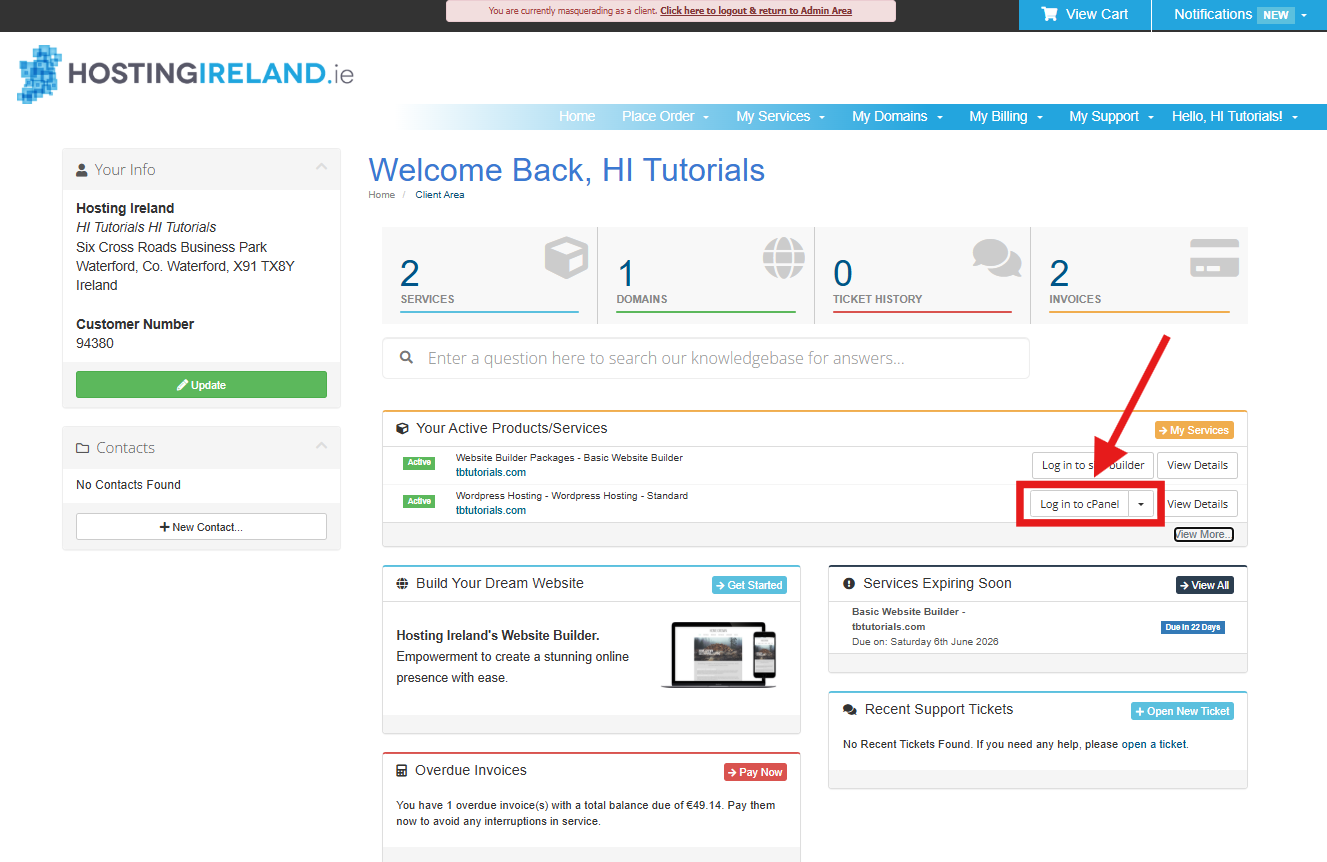
From your Client Area dashboard, go to Your Active Products/Services.
Find the email or web hosting service you want to manage, then select Log in to cPanel.
This option is used for both:
- Email-only hosting packages.
- Web hosting packages that include email and website hosting.
Step Three
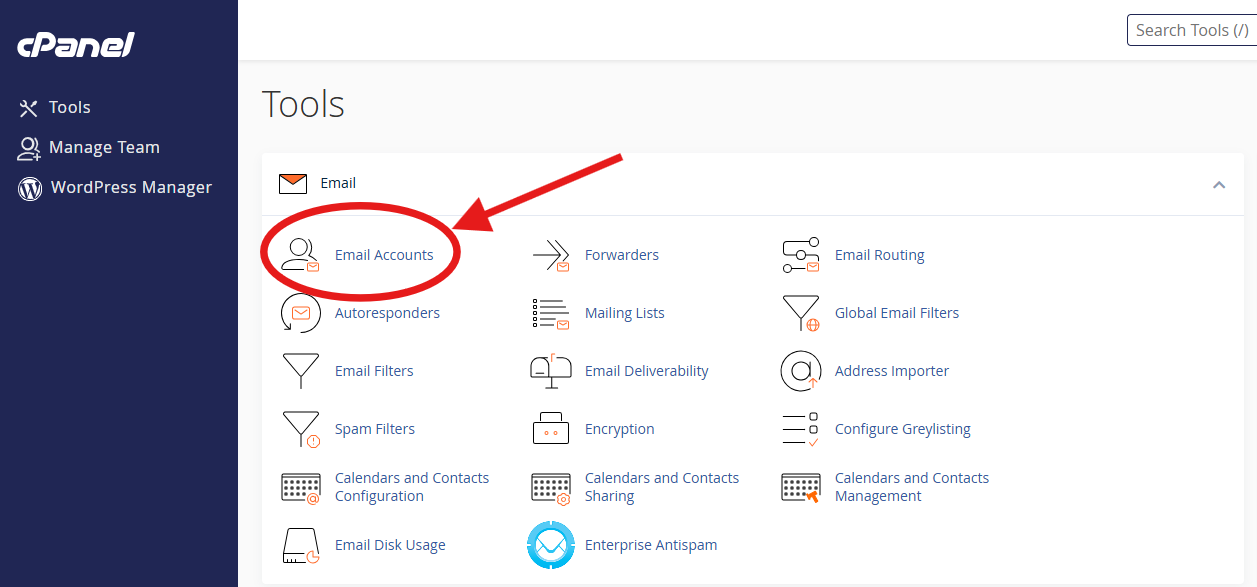
Once cPanel opens, go to the Email section.
Select Email Accounts.
Step Four
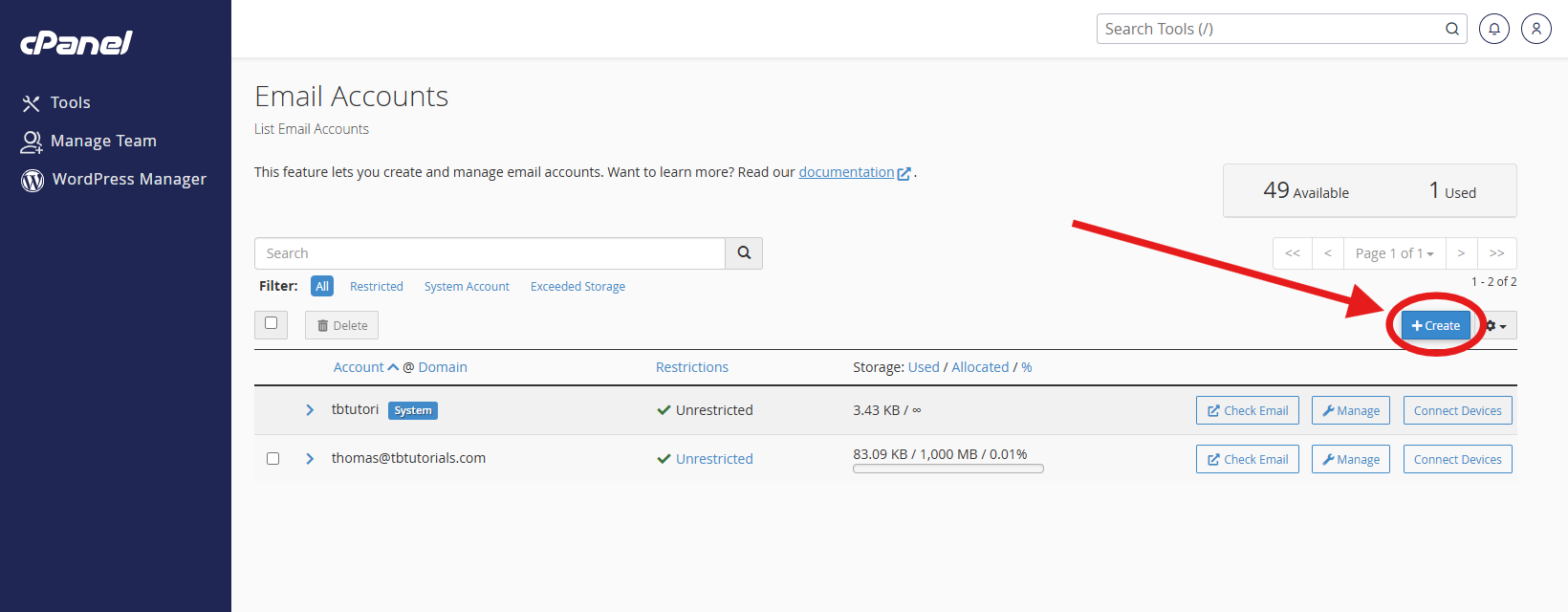
On the Email Accounts page, select Create.
Step Five
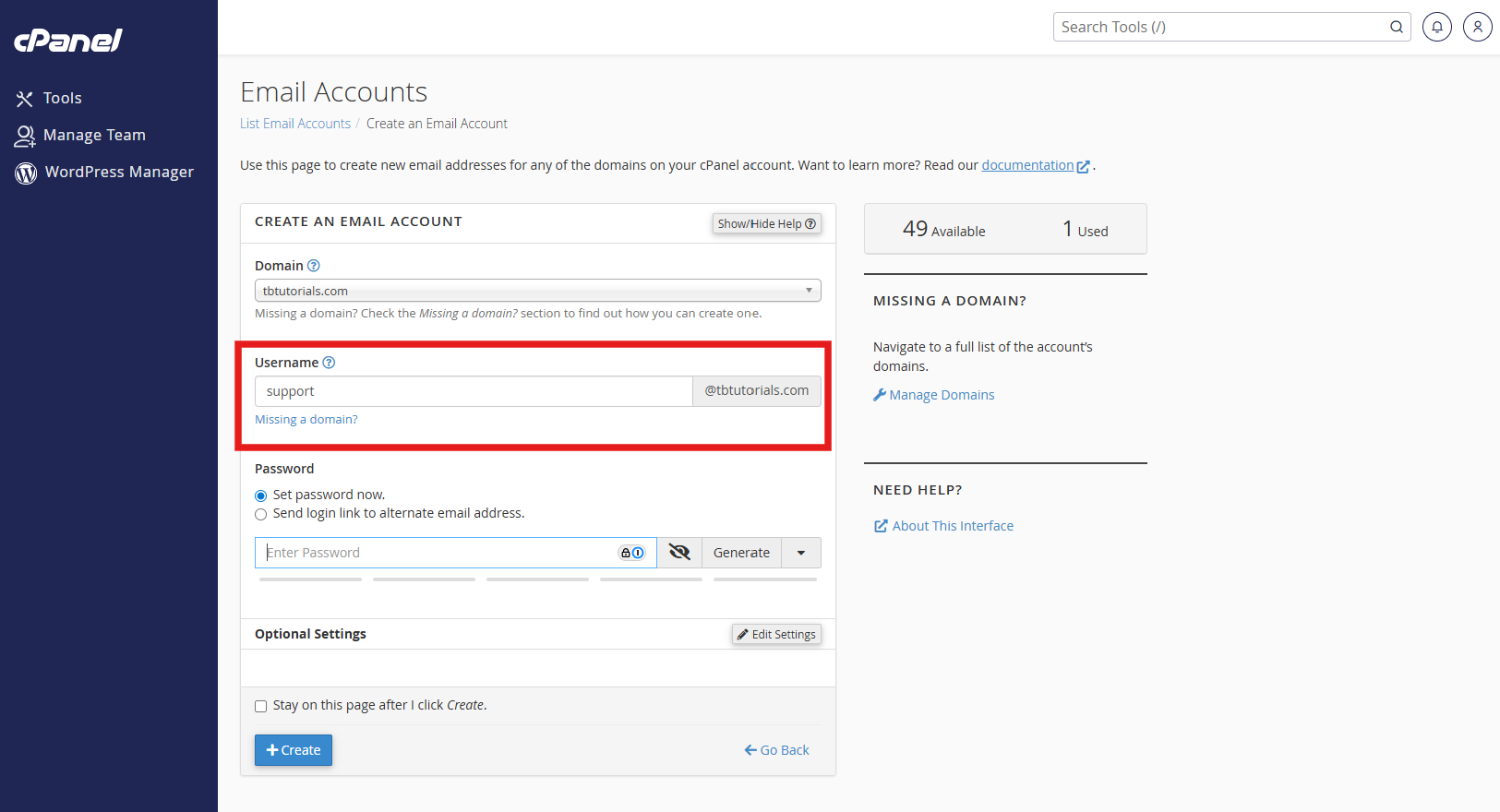
Select the domain you want to create the email address for.
This option may only appear if there is more than one domain available on the cPanel account.
Enter the username for the new email account. This is the part before the @ symbol.
For example:
support
This would create:
Step Six
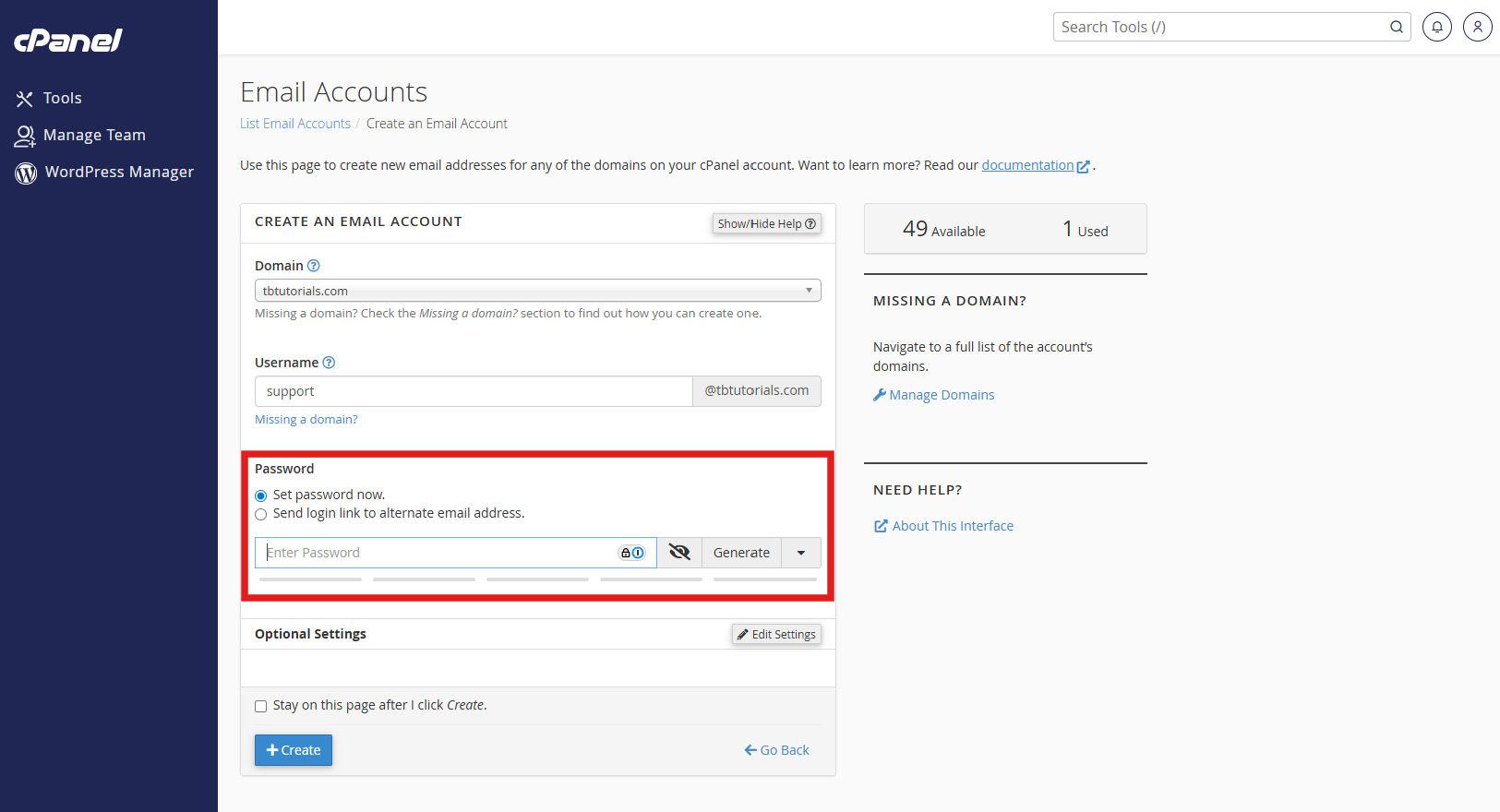
Choose how the password should be set.
You can either:
Set password now
Enter a password for the mailbox now.
Send login link to alternate email address
Send a setup link to another email address. The person receiving the link will be prompted to create their own password.
If you are setting the password now, choose a strong password that is not used anywhere else.
Step Seven
Select Create.
The email account will now be created.
Step Eight
You can now use the email account.
You can either:
Log in through Webmail.
Add the email account to an email app such as Outlook, Apple Mail, Gmail or Thunderbird.
For help logging in to Webmail or setting up your email account on a device, see:
How to log in to Webmail
[#link]
Email setup guides
[#link]
Need more help?
If you have any further questions, please raise a support request from your Client Area or call us on 01 9020020.

'%3e%3cg id='Final-Copy-2_2_' transform='translate(1275.000000, 200.000000)'%3e%3cpath class='st0' d='M7.4,12.8h6.8l3.1-11.6H7.4C4.2,1.2,1.6,3.8,1.6,7S4.2,12.8,7.4,12.8z'/%3e%3c/g%3e%3c/g%3e%3c/g%3e%3cg id='final---dec.11-2020'%3e%3cg id='_x30_208-our-toggle' transform='translate(-1275.000000, -200.000000)'%3e%3cg id='Final-Copy-2' transform='translate(1275.000000, 200.000000)'%3e%3cpath class='st1' d='M22.6,0H7.4c-3.9,0-7,3.1-7,7s3.1,7,7,7h15.2c3.9,0,7-3.1,7-7S26.4,0,22.6,0z M1.6,7c0-3.2,2.6-5.8,5.8-5.8 h9.9l-3.1,11.6H7.4C4.2,12.8,1.6,10.2,1.6,7z'/%3e%3cpath id='x' class='st2' d='M24.6,4c0.2,0.2,0.2,0.6,0,0.8l0,0L22.5,7l2.2,2.2c0.2,0.2,0.2,0.6,0,0.8c-0.2,0.2-0.6,0.2-0.8,0 l0,0l-2.2-2.2L19.5,10c-0.2,0.2-0.6,0.2-0.8,0c-0.2-0.2-0.2-0.6,0-0.8l0,0L20.8,7l-2.2-2.2c-0.2-0.2-0.2-0.6,0-0.8 c0.2-0.2,0.6-0.2,0.8,0l0,0l2.2,2.2L23.8,4C24,3.8,24.4,3.8,24.6,4z'/%3e%3cpath id='y' class='st3' d='M12.7,4.1c0.2,0.2,0.3,0.6,0.1,0.8l0,0L8.6,9.8C8.5,9.9,8.4,10,8.3,10c-0.2,0.1-0.5,0.1-0.7-0.1l0,0 L5.4,7.7c-0.2-0.2-0.2-0.6,0-0.8c0.2-0.2,0.6-0.2,0.8,0l0,0L8,8.6l3.8-4.5C12,3.9,12.4,3.9,12.7,4.1z'/%3e%3c/g%3e%3c/g%3e%3c/g%3e%3c/g%3e%3c/svg%3e) Your Privacy Choices
Your Privacy Choices